
Top 12 Best Chair for Computer Work That Boosts Comfort!
Sitting for hours on end in the wrong chair can quickly turn a productive work session into a painful experience. The best chair for computer work supports your posture, keeping back pain and stiffness at bay even after long stretches at the desk.
Cheap or poorly designed chairs often lack adjustability and proper lumbar support, making it hard to stay comfortable or maintain proper form.
A good chair in this category generally offers adjustable seat height and tilt, allowing you to align the chair to your desk and body size precisely. Materials matter too; breathable mesh backs keep you cooler during long sessions, while dense foam padding provides firm support without bottoming out.
A chair with a weight capacity around 250 pounds typically fits most users safely and stably, and smooth-rolling casters ensure ease of movement on office floors.
Need a Quick Check?
| Image | Product | Price |
|---|---|---|
Our Top Picks 1 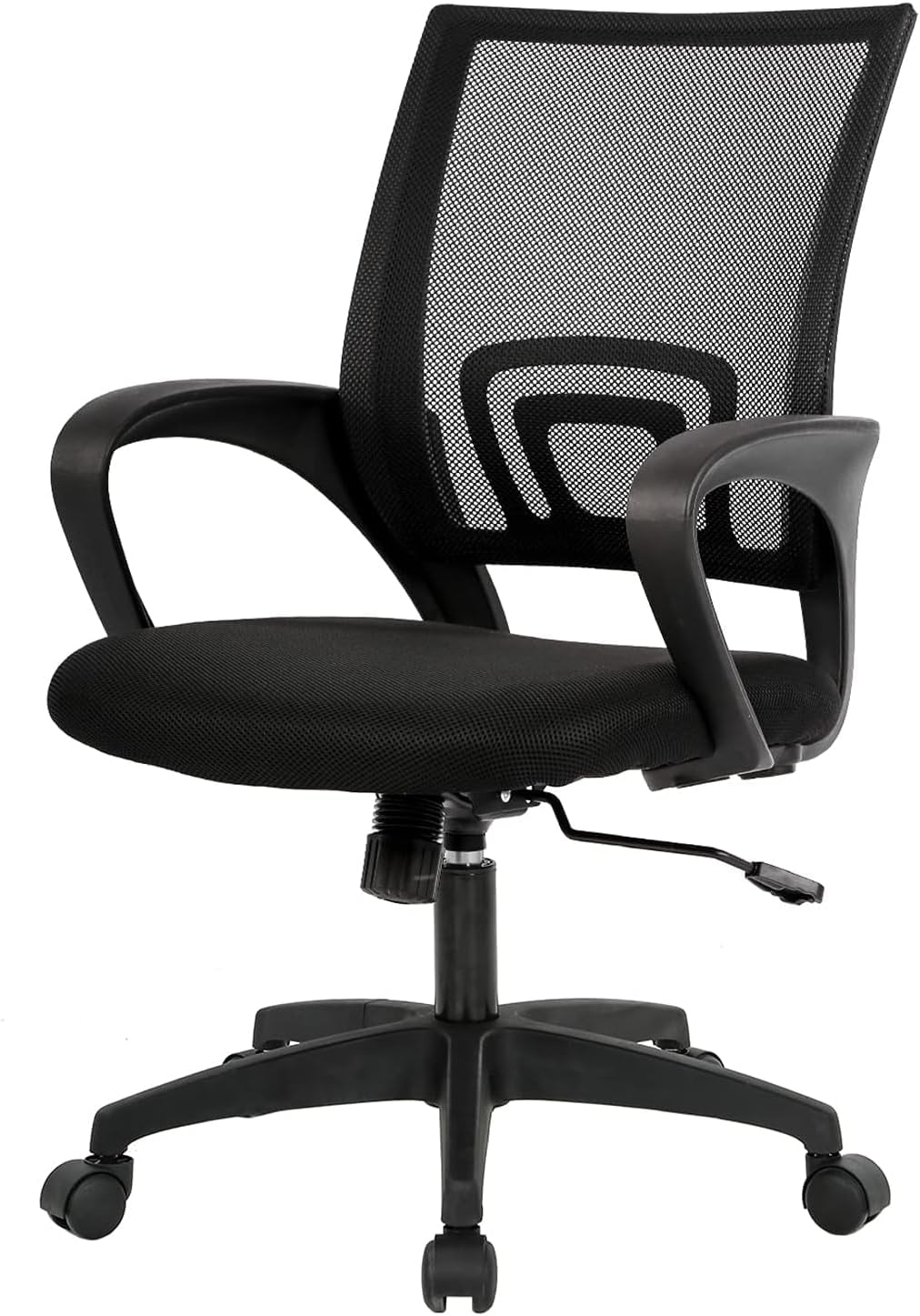 | BestOffice Mid-Back Chair | Check Price |
Our Top Picks 2  | GTPLAYER PU Leather Chair | Check Price |
Our Top Picks 3  | Ergonomic Mesh High Back Chair | Check Price |
Our Selected Top 12 Chair for Computer Work Picks for Every Need
This list features carefully chosen chairs designed for computer work, highlighting their comfort, support, and usability. Each review explains how the chair performs, who it’s best suited for, and outlines its main strengths and weaknesses to help you make an informed decision.
1. BestOffice Mid-Back Ergonomic Office Chair
Sitting for long hours doesn’t feel tiring with this chair thanks to its breathable mesh back and ergonomic shape. It suits anyone working from home or an office who needs comfort without overheating.
Its biggest strength is how well it keeps you cool while providing solid lumbar support.
Setup is straightforward with a simple height adjustment from 17.1 to 20.3 to fit various desk heights. The curved mid-back with built-in lumbar support and ergonomic armrests make daily sitting less fatiguing. Smooth swivel and rolling wheels improve mobility, while the high-density cushion offers enough breathability to stay comfortable through long work sessions.
Performance matches what you’d want from an office chair aimed at comfort and durability. It holds up well with sturdy materials complying with BIFMA standards.
Reviews mostly praise its support and airflow, though some mention the armrests could feel a bit narrow. The construction feels solid, with no wobbling or instability reported.
High marks go to the chair’s airflow and lumbar support, keeping you comfortable and cool during extended use. Common feedback points to armrests feeling too narrow, which can reduce comfort for wider frames.
Anyone wanting a mid-back chair that addresses heat and back fatigue will find this suitable. Users who need extensive armrest padding or full-high backs might want to explore other models.
Pros
- Ventilated mesh back keeps air flowing
- Adjustable height fits many desk setups
- Ergonomic lumbar support reduces back fatigue
- Durable materials certified by BIFMA standards
Cons
- Armrests feel a bit narrow for some users
- Mid-back design may not suit taller individuals
| Specification | Details |
|---|---|
| Adjustable Seat Height | 17.1″–20.3″ |
| Back Material | 100% Ventilated Mesh |
| Model Number | VN-H03-BLACK |
| Unit Count | 1 Count |
| Manufacturer | Xin Feng International Company Limited |
| Key Features | Lumbar Support, Adjustable Height, Breathable Backrest |
2. GTPLAYER PU Leather Office Chair
Great choice for anyone needing a comfortable chair for long hours at a desk, especially in smaller spaces. Its biggest strength lies in the adjustable 90° flip-up armrests that save space while keeping you supported during work or gaming.
Setting up the chair is straightforward, with the armrests flipping up to tuck the chair close to the desk or down for elbow support. The built-in lumbar support fits your spine’s natural curve, which helps reduce back fatigue during extended use.
The rocking feature is subtle, offering just enough movement to stay comfortable without being distracting.
It performs well as a mid-back office chair, providing steady support across work or gaming sessions. The PU leather feels durable enough for everyday use while staying relatively easy to clean.
Reviews praise the ergonomic design for alleviating back pain, but some mention the low back might not suit those seeking full upper-back coverage.
Many find the lumbar support effective for easing back pressure during long work or gaming sessions. A frequent concern is the chair’s lower back design, which may not provide enough upper-back support for some users.
Those working in tight spaces or needing a chair that tucks neatly under the desk will appreciate this model. People requiring full upper-back support might want to explore chairs with higher backs or different designs.
Pros
- Flip-up armrests save valuable desk space
- Ergonomic lumbar support reduces back fatigue
- Comfortable mid-back design for long periods
- Flexible rocking for gentle movement
Cons
- Low-back height may not suit taller users
- PU leather surface can feel warm after hours
| Specification | Details |
|---|---|
| Model Number | CH228-NEW |
| Armrest Type | 90° Flip-up Arms |
| Material | PU Leather |
| Ergonomic Features | Built-in Lumbar Support, Winged Mid-back Design |
| Recommended Uses | Computer, Office, Relaxing, Video Game |
| Room Type | Bedroom, Living Room, Office, Study Room |
3. Ergonomic Mesh High Back Office Chair
Mesh fabric and a high back design make this chair ideal for people working long hours at a desk. It suits users from 5’5 to 6’2 and is built to reduce back strain with its adjustable lumbar support.
Comfort during extended periods is its standout quality.
Setting it up involves attaching the headrest, arms, and base, which all come included. The lumbar support adjusts in two inches over eight levels to fit your lower back precisely. Flip-up arms help with close desk access, and the breathable mesh keeps you cool through long work or gaming sessions.
The chair supports long hours well by evenly distributing weight and lowering pressure on the lumbar spine by 50%. Its structure holds up under prolonged use due to BIFMA X5.1 certification.
Some users note the adjustment steps could be smoother, but the firm build and snug fit receive praise.
The chair’s lumbar support effectively reduces lower back pressure by half, making long work sessions less tiring. Some find the micro-adjust lumbar control a little stiff to adjust, which can make fine-tuning a bit cumbersome.
People who spend extended hours seated and need precise lumbar support will find this chair very comfortable. Those who want a chair for outdoor use or smoother adjustments might want to consider other options.
Pros
- Adjustable lumbar support with 8 custom levels
- Flip-up arms offer more desk access
- Supports users 5’5″ to 6’2″ comfortably
- Durable structure certified by BIFMA X5.1
Cons
- Lumbar adjustment feels a bit stiff
- Only recommended for indoor use
| Specification | Details |
|---|---|
| Brand Name | CAPOT |
| Model Name | Home Office Desk Chair |
| Lumbar Adjuster | 2 inches, 8 levels |
| Adjustable Features | Headrest, Backrest, Flip-Up Arms |
| Certification | BIFMA X5.1 |
4. TRALT Ergonomic Office Chair with Lumbar Support

Comfort and support stand out on this chair, especially for those sitting long hours at a desk. It suits adults working in offices, bedrooms, or study rooms and delivers consistent cushioning without the usual flattening seen in similar models.
Setting it up is straightforward. The adjustable lumbar support adapts to your spine’s natural curve, easing lower back pressure during extended use.
The headrest, backrest, and height adjustments all help tailor the fit to your body, while the armrests add extra comfort for typing or gaming marathons.
The main job of supporting long computer sessions is handled well. The seat foam keeps its shape and bounce, sidestepping the common sagging problem in this price range. Built to last with quality mechanisms for lumbar support, some users mention the armrests could be a bit wider.
Solid performance for day-to-day office work.
The chair’s foam seat retains cushioning longer than budget options, preventing bottoming out during many hours of sitting. The lumbar support is another strong aspect, but some mention the armrests feel too narrow for comfortable use all day. Assembly and adjustments are manageable without specialist tools.
People needing consistent lumbar relief and a foam seat that holds up over time will find this chair meets their needs well. Those requiring wider armrests or outdoor use should look elsewhere. It fits best in indoor workspaces with hard floors and suits adults looking for ergonomic support without premium pricing.
Pros
- High-resilience molded foam seat
- Adjustable lumbar support matches spine curve
- Multiple adjustable features for personalized fit
- Works well on hard floor surfaces
Cons
- Armrests may feel narrow for some users
- Indoor use only, not suitable for outdoors
| Specification | Details |
|---|---|
| Brand Name | TRALT |
| Model Name | TRALT+TRALT+YX001-2-W-B-US |
| Adjustable Features | Backrest, Headrest, Height, Lumbar, Arm Rest |
| Recommended Uses | Office |
| Room Type | Bedroom, Library, Office, Office Reception, Study Room |
| Surface Recommendation | Hard Floor |
5. GTPLAYER Gaming Chair with Footrest and Lumbar Support

A chair designed for long hours of computer work that values comfort and support. It suits adults who want more than a standard office chair, especially those who appreciate an adjustable footrest and targeted lumbar support.
Its strongest feature is the combination of headrest and waist pillow that help reduce body fatigue.
Setting it up is straightforward with a solid metal frame and plastic arm pads. Daily use reveals how the footrest allows for moments of relaxation without leaving your seat.
The headrest is a great relief for neck stiffness, and the lumbar pillow gives firm support to the lower back, encouraging better posture throughout the day.
The chair handles extended sitting well, maintaining stability thanks to its metal legs that resist weather and wear without rusting or breaking. It is quite comfortable and supportive, but some might find the footrest bulky in smaller spaces. The materials feel durable and reliable for indoor use, although cleaning the surface could take some extra care.
Comfort stands out with the headrest easing neck fatigue and the waist pillow providing good back support during extended sessions. The most frequent downside is that the footrest becomes inconvenient in tight workspaces, limiting chair placement options.
Those wanting a supportive chair for marathon computer work will appreciate the ergonomic features and sturdy build. People with limited room or who prefer minimal furniture might want to explore more compact chairs without a footrest.
Pros
- Comfortable headrest and lumbar support included
- Metal frame legs for strong stability
- Integrated footrest for added relaxation
- Suitable for long sitting periods
Cons
- Footrest may take up extra space
- Cleaning the surface requires careful handling
| Specification | Details |
|---|---|
| Brand Name | GTPLAYER |
| Model Name | GT800A |
| Additional Features | Foot Rest |
| Included Components | Arm Pad |
| Surface Recommendation | Hard Floor |
| Recommended Uses For Product | Office |
6. GTPLAYER Big and Tall Gaming Chair with Footrest

Sitting comfortably when you’re bigger or taller can be a real challenge, especially at a computer. GTPLAYER Big and Tall Gaming Chair with Footrest fits up to 400lbs and is designed to support your body fully, especially around the head, neck, and back.
Its biggest strength is the tailored support that actually reduces pressure in key areas during long sessions.
Setup is straightforward and the chair feels sturdy right out of the box. The adjustable headrest and backrest make it easy to find your comfort zone.
The built-in spring lumbar support and the cloud-like dual-layer cushion keep your back supported without feeling stiff. The included throw pillow adds an extra layer of comfort, especially when you want to lean back and relax.
It handles long hours at a desk or gaming station with ease, thanks to its cushioning and strong frame. The backrest wraps around your sides, which really helps reduce backaches.
Most praise focuses on how supportive and comfortable it is for larger body types. The biggest complaint revolves around the size, as it can be bulky in smaller rooms.
Most users appreciate the strong support around the head, neck, and back, which helps cut down pressure during extended sitting. The common downside is that the chair takes up quite a bit of space, which can be an issue in compact home offices or bedrooms.
Those looking for a roomy, supportive chair designed for bigger frames will find this works well for daily computer or gaming use. Anyone with limited space or a smaller build may want to look for something more compact or tailored to their size.
Pros
- Supports up to 400 pounds comfortably
- Adjustable backrest and headrest for personalized fit
- Thicker, enlarged headrest offers good neck support
- Feels soft and supportive with cloud-like cushioning
Cons
- Bulky size may not fit smaller rooms well
- Design is more suited to large and tall users only
| Specification | Details |
|---|---|
| Weight Capacity | 400lbs |
| Brand Name | GTPLAYER |
| Model Number | L-CH510 |
| Included Components | Throw pillow |
| Adjustable Features | Backrest, Headrest |
| Cushion Type | Dual-layer high-density sponge |
7. Furmax High Back Executive PU Leather Office Chair

Supports up to 1.5 times the BIFMA standard, making it sturdy and reliable for long hours at a desk. Designed for adults working indoors, the chair suits anyone wanting solid stability combined with ergonomic comfort. Its biggest strength lies in the reinforced frame that prevents gradual sinking over time.
Setting it up takes just the usual assembly steps guided by the included manual. Daily use is comfortable thanks to the adjustable lumbar support, headrest, and armrests. You can easily change the height and tilt angle, with a smooth 360-degree swivel allowing easy movement.
The PU leather is easy to wipe clean and feels comfortable without being too hot.
Durability stands out since the heavy-duty gas lift keeps the seat stable without sinking unexpectedly. The chair holds steady on hard floors and allows tilting for relaxing breaks.
Most users praise how stable it feels, while a few mention the armrests could have more adjustability. The build quality matches its performance for typical office tasks.
Strong stability and no gradual sinking make the chair reliable for day-to-day work. Most complaints mention the armrests could offer more movement to better suit different body types.
People needing a stable, ergonomic chair for standard office use will appreciate this model. Those wanting highly adjustable armrests or cooler seating materials might prefer an alternative.
Pros
- Supports 1.5 times BIFMA weight standard
- Adjustable height and backrest
- 360-degree smooth swivel base
- Includes adjustable lumbar and head support
Cons
- Armrests lack extensive adjustability
- PU leather can feel warm during long use
| Specification | Details |
|---|---|
| Brand Name | Furmax |
| Model Name | Office Desk Chair |
| Surface Recommendation | Hard Floor |
| Included Components | A Manual |
| Number of Packs | 1 |
8. GTPLAYER Big and Tall Office Chair with Lumbar Support

Designed for big and tall adults who spend long hours working or gaming at their desks, this chair offers excellent lumbar support as its main strength. It suits anyone needing better posture and relief from back pain with a durable build tailored to heavier users.
Setting it up is straightforward, and its adjustable backrest and height let you find a comfortable position easily. The dual-layer seat with pocket springs provides a soft, sofa-like feel that adapts as you move. A waist pad included in the package adds extra lower back comfort during extended use, making long sessions less tiring.
It performs well in supporting the entire back using a high-back ergonomic design that contours naturally to your spine. The combination of a soft cushion and firm layer helps keep fatigue at bay.
Quality materials contribute to solid construction, though some mention the chair may take time to get accustomed to its firmness.
The back support design actively contours to the natural spine curve and reduces fatigue after long hours. One drawback reported is the firmness of the seat cushion, which can take some getting used to for a softer feel.
Anyone needing a chair built specifically for big and tall users with focus on back health will appreciate this model. People who prefer ultra-soft seats or require outdoor seating should consider alternatives.
Pros
- Ergonomic full-body wrap supports entire spine
- Seat uses sofa-grade pocket spring technology
- Adjustable backrest and height for personalized fit
- Includes extra waist pad for lumbar comfort
Cons
- Firm cushion may feel hard initially
- Limited to indoor use only
| Specification | Details |
|---|---|
| Brand Name | GTPLAYER |
| Model Name | L-CH1001 |
| Included Components | Waist Pad |
| Recommended Uses | Computer, Gaming, Office, Reading, Relaxing |
| Manufacturer Warranty Description | 1 year warranty |
9. NEO CHAIR High Back Mesh Office Chair

Designed for long hours at a desk, this chair suits anyone needing consistent back support during computer work. The standout feature is its breathable mesh back, which focuses on lower back support to keep posture healthy and comfort steady through extended sitting.
Setting it up takes little time, and adjustments are straightforward. You can raise or lower the height, tilt the seat, and tweak the lumbar support for your personal comfort. The armrests flip up, making it easy to fit under desks or change posture.
The 360° swivel adds freedom to move around without standing.
The chair handles daily computer work well, offering steady support without feeling cramped. Its construction feels durable with quality caster wheels.
Most praise is for the ergonomic back design and flexible armrests, while a common complaint is that the seat padding may not please those wanting extra cushioning.
The ergonomic mesh back and adjustable lumbar support gain strong approval for comfort during long sitting periods. A common issue revolves around the seat’s thin padding, which some find less cushioned than desired.
Those working at desks for hours will find this chair supportive and customizable. Anyone prioritizing thick seat cushioning or outdoor use may want to explore other options better suited to those needs.
Pros
- Breathable mesh back supports posture
- Flip-up armrests save space
- Adjustable lumbar support for comfort
- 360° swivel enables easy movement
Cons
- Seat padding is somewhat thin
- Not designed for outdoor use
| Specification | Details |
|---|---|
| Adjustable Height | Yes |
| Swivel | 360° |
| Brand Name | NEO CHAIR |
| Model Number | DBS-02 |
| Additional Features | Rolling, Adjustable Height, Swivel |
10. Marsail Ergonomic High Back Mesh Office Chair

Marsail Ergonomic High Back Mesh Office Chair suits anyone looking for a highly adjustable and supportive seat for long computer sessions. Its standout feature is the fully customizable adjustments, including a headrest and lumbar support, designed to keep you comfortable in various work postures.
Setting up the chair is straightforward, with several adjustable parts like the 2D headrest, reclinable backrest, and 3D armrests allowing you to tailor it to your body. The lumbar support moves both up and down, and forward and backward, helping you maintain a good posture during extended hours.
The mesh backrest also keeps airflow steady, so you don’t get overheated while working.
Performance-wise, the chair delivers solid support and comfort for office tasks thanks to its flexible adjustments and breathable materials. Its build quality feels reliable for indoor use, with smooth caster movement on hard floors. Most praise centers on its adaptable lumbar support, while the common drawback involves the chair’s design catering mainly to hard floor surfaces, limiting versatility.
The most appreciated feature is the chair’s adaptable lumbar support allowing users to find just the right height and depth, creating a comfortable sitting posture. The main complaint involves the chair’s limited compatibility with floor types, specifically favoring hard floors, which may restrict placement options in some rooms.
People who spend long hours sitting and need precise adjustment will find this chair suits their needs well. Individuals who require softer cushioning or use it on carpeted or uneven floors should consider models better tailored for those conditions.
Pros
- Highly adjustable lumbar support for personalized comfort
- Breathable mesh backrest keeps you cool
- Multiple reclining positions for dynamic seating
- Armrests adjust in three dimensions
Cons
- Designed mainly for use on hard floors
- May not suit users looking for plush padding
| Specification | Details |
|---|---|
| Model Name | RM-MSOC10B |
| Adjustable Features | Headrest, Backrest, Arm Rest, Height, Lumbar |
| Backrest Recline Angle | 90° to 120° |
| Lumbar Support Adjustment | 1.18″ forward/backward, 2.16″ up/down |
| Recommended Use | Office, Reading, Relaxing |
| Floor Type | Hard Floor |
11. SIHOO M18 Ergonomic Mesh Office Chair with Headrest

Sitting in the SIHOO M18 feels supportive right from the start, aimed at anyone between 5’6 and 6’2 who spends long hours at a desk. Its biggest strength is the range of ergonomic adjustments allowing you to customize head, back, hip, and arm support without much effort.
Setup is straightforward, with a clear user manual guiding through assembly. Day-to-day, the adjustable headrest and lumbar support stand out by helping reduce discomfort. The breathable mesh keeps things cool, and you can tilt or lock the chair’s recline to find the right angle for work or breaks.
Armrests adjust, adding to the overall fit for longer sessions.
Performance-wise, the chair holds up to 330 pounds reliably and manages to stay comfortable throughout extended use. Its build feels sturdy with good back support.
Most people notice how well the lumbar support adapts, while some find the armrest adjustments a bit limited or not quite comfortable for their specific needs.
Most praise focuses on the lumbar support’s effectiveness and how comfortable the mesh seat stays during long hours. A common gripe involves the armrests not adjusting enough to fit every body shape perfectly.
Anyone between 5’6″ and 6’2″ needing adjustable support will appreciate this chair. Those taller, shorter, or seeking more armrest flexibility might explore alternatives better suited to those specific preferences.
Pros
- Adjustable headrest and lumbar for targeted support
- Breathable mesh avoids overheating
- Strong weight capacity up to 330lbs
- Easy to assemble with included manual
Cons
- Armrests offer limited adjustment options
- May not suit people outside 5’6″ to 6’2″ height range
| Specification | Details |
|---|---|
| Adjustable Lumbar Support | Yes |
| Weight Capacity | 330lbs |
| Adjustable Recliner | Yes |
| Armrests | 2D Adjustable |
| Recommended Uses For Product | Office |
12. Bestier Criss Cross Chair with Flip-Up Armrests

Great for those who spend long hours at their desk and want versatile seating options. The Bestier Criss Cross Chair stands out with its flexible reclining backrest and armrests that flip up, allowing comfortable cross-legged sitting which is rare in many office chairs.
Setup is straightforward, and you’ll appreciate how easy it is to switch between focused work and lounging. The backrest reclines up to 135°, which lets you lean back during breaks, while the armrests flip up in five positions to free up your sides for different leg positions. Height adjustment and smooth rolling wheels add to daily convenience.
It performs well as a computer and office chair, supporting various postures comfortably throughout the day. Built with a BIFMA-tested rolling base and 100 mm gas lift height adjustment, it feels sturdy.
The plush black finish adds a cozy touch. Conversations praise its flexibility, although some find the cushioning could be firmer for long sessions.
Strongest praise highlights the chair’s flexible backrest and armrest design, which offers multiple comfortable sitting positions not often found in typical office chairs. The main complaint revolves around the cushioning feeling a bit soft during longer periods of use.
Ideal for those who enjoy changing posture frequently while working or gaming in a home office. People looking for firmer support or a wider range of colors might want to consider other models.
Pros
- Adjustable reclining backrest up to 135°
- Flip-up armrests ideal for cross-legged sitting
- Sturdy BIFMA-tested rolling base
- Height adjustable with smooth gas lift
Cons
- Cushioning may feel soft for extended use
- Limited color options, only plush black
| Specification | Details |
|---|---|
| Reclining Backrest | Up to 135° |
| Armrests | 5-level flip-up, 90° |
| Base | BIFMA-tested rolling |
| Height Adjustment | 100 mm gas lift |
| Color | Plush black |
| Recommended Uses | Computer desk, gaming, home office |
Best Chairs for Computer Work Comparison Table
| Product | Recommended Uses | Adjustable Features | Age Range | Room Type |
|---|---|---|---|---|
| BestOffice Mid-Back Chair | Office | Ergonomic | Adult | Office |
| GTPLAYER PU Leather Chair | Computer, Office, Relaxing | Ergonomic | Adult | Bedroom, Living Room, Office, Study Room |
| Ergonomic Mesh High Back Chair | Working, Gaming, Studying, Relaxing | Lumbar, Headrest, Arms | All-Ages | Game Room, Office, Study Room |
| TRALT Lumbar Support Chair | Office | Adjustable Backrest, Headrest, Height, Lumbar, Arm | Adult | Bedroom, Library, Office, Reception, Study Room |
| GTPLAYER Gaming Chair Footrest | Office | Foot Rest | Adult | Office |
| GTPLAYER Big & Tall Gaming | Computer, Gaming, Office, Relaxing | Adjustable Backrest, Headrest, Back Support | – | – |
| Furmax Executive PU Leather Chair | Office | Lumbar, Height, Backrest, Arm, Head, Reclining | Adult | Office |
| GTPLAYER Big & Tall Office | Computer, Gaming, Office, Reading, Relaxing | Adjustable Backrest, Height, Back Support | – | Bedroom, Game Room, Office, Study Room |
| NEO CHAIR High Back Mesh | Computer, Office, Reading, Video Game | Adjustable Height, Rolling, Swivel | Adult | Bedroom, Classroom, Kids Room, Library, Study Room |
| Marsail Ergonomic Mesh Chair | Office, Reading, Relaxing | Backrest, Headrest, Height, Lumbar, Arm | Adult | Bedroom, Home, Living Room, Office, Study Room |
| SIHOO M18 Mesh Chair | Office | Headrest, Arm Rest, Lumbar, Tilt, Recliner | Adult | Office |
| Bestier Criss Cross Chair | – | Reclining Backrest, Flip-up Armrests, Height Adjust | – | – |
- Recommended UsesOffice
- Adjustable FeaturesErgonomic
- Age RangeAdult
- Room TypeOffice
- Recommended UsesComputer, Office, Relaxing
- Adjustable FeaturesErgonomic
- Age RangeAdult
- Room TypeBedroom, Living Room, Office, Study Room
- Recommended UsesWorking, Gaming, Studying, Relaxing
- Adjustable FeaturesLumbar, Headrest, Arms
- Age RangeAll-Ages
- Room TypeGame Room, Office, Study Room
- Recommended UsesOffice
- Adjustable FeaturesAdjustable Backrest, Headrest, Height, Lumbar, Arm
- Age RangeAdult
- Room TypeBedroom, Library, Office, Reception, Study Room
- Recommended UsesOffice
- Adjustable FeaturesFoot Rest
- Age RangeAdult
- Room TypeOffice
- Recommended UsesComputer, Gaming, Office, Relaxing
- Adjustable FeaturesAdjustable Backrest, Headrest, Back Support
- Age Range–
- Room Type–
- Recommended UsesOffice
- Adjustable FeaturesLumbar, Height, Backrest, Arm, Head, Reclining
- Age RangeAdult
- Room TypeOffice
- Recommended UsesComputer, Gaming, Office, Reading, Relaxing
- Adjustable FeaturesAdjustable Backrest, Height, Back Support
- Age Range–
- Room TypeBedroom, Game Room, Office, Study Room
- Recommended UsesComputer, Office, Reading, Video Game
- Adjustable FeaturesAdjustable Height, Rolling, Swivel
- Age RangeAdult
- Room TypeBedroom, Classroom, Kids Room, Library, Study Room
- Recommended UsesOffice, Reading, Relaxing
- Adjustable FeaturesBackrest, Headrest, Height, Lumbar, Arm
- Age RangeAdult
- Room TypeBedroom, Home, Living Room, Office, Study Room
- Recommended UsesOffice
- Adjustable FeaturesHeadrest, Arm Rest, Lumbar, Tilt, Recliner
- Age RangeAdult
- Room TypeOffice
- Recommended Uses–
- Adjustable FeaturesReclining Backrest, Flip-up Armrests, Height Adjust
- Age Range–
- Room Type–
How to Choose the Best Computer Chair
Comfort, adjustable support, and durability are key factors when selecting a computer chair, as they help maintain good posture and reduce strain during long hours of work. Choosing the right features prevents discomfort and costly replacements, ensuring better productivity and health over time.
Ergonomics and Comfort
Sitting for hours on a chair with fixed height or stiff armrests quickly turns into discomfort and distraction. Chairs lacking proper lumbar support often cause lower back strain because they fail to maintain the natural curve of the spine.
One badly positioned armrest or an unadjustable seat height can cause shoulders to tense or hips to misalign. Over time, this adds up to aches that could have been prevented.
Good office chairs usually offer a height range of about 16 to 21 inches to match various desks and body heights. Armrests that adjust in height and width keep shoulders relaxed, while backrests that recline up to 120 degrees help reduce pressure during long sessions.
Firmness of the cushion matters too, too soft might feel comfortable at first but leads to sinking and bad posture. Breathable fabric or mesh keeps the user cooler and prevents sweating, which makes sitting long hours more bearable.
Build Quality and Materials
A chair that creaks or wobbles after a year shows poor frame quality and can disrupt focus. The frame and base made of steel or solid aluminum typically hold up better than plastic, which might crack or bend under regular use.
The padding inside the seat and back also matters; cheap foam tends to lose shape quickly, making the chair uncomfortable.
Upholstery made of mesh or high-quality fabric tends to resist tears and pilling better than synthetic leather, which can crack over time. Durable materials reduce the need for replacements and keep the chair looking and functioning well after years of daily use. Checking for warranties and customer reviews about material longevity can give a clearer idea before buying.
Size and Fit
Standard chairs often fit average body sizes but can feel tight or unstable for larger users, while very small chairs don’t support taller people well. Proper seat width and depth help maintain good posture by allowing feet to rest flat on the floor and preventing pressure points behind the knees.
Seats around 18 to 20 inches wide and 15 to 18 inches deep tend to suit most users.
Adjustability plays a big role in adapting the chair to different shapes and weights. The weight capacity should be clearly stated, often ranging from 250 to 300 pounds or more for sturdy models.
A wide range of seat height, lumbar support, and armrest adjustments ensure the chair fits not just one person, but anyone who uses it, which is especially important for shared workspaces.
Mobility and Stability
Cheap chairs often come with casters that stick or roll unevenly, which is frustrating on hardwood or carpeted floors. Casters designed specifically for the floor type prevent damage and allow smooth movement. A five-point base is usually more stable and less likely to tip compared to four-legged or three-legged designs.
Weight capacity is a solid indicator of overall strength. A chair rated for at least 250 pounds is generally stable for most users, but heavier individuals may need models designed for 350 pounds or more. Slim bases may look nice but risk wobbling with dynamic movements.
A heavy enough base paired with quality casters ensures the chair stays put without causing accidents or wear.
Ease of Maintenance
Cleaning chairs covered in fabric or mesh is easier when the materials can resist stains and odors. Mesh tends to dry quickly and breathe better, reducing sweat buildup and odor, while some synthetic leathers are easier to wipe clean but might trap odors longer. Removable covers or cushions simplify deep cleaning.
Chairs that come apart easily let users replace worn-out parts like armrests or cushions without buying a new one. Look for models where screws and clips are accessible and clearly labeled. Routine dusting and occasional wiping prevent buildup that can damage the material over time.
Consider how tightly the upholstery fits as loose fabric can trap dirt and make cleaning more difficult.
Ergonomic Practices to Maximize Comfort While Using Computer Chairs
Sitting for hours requires a chair that supports natural posture. Adjust the chair height so your feet rest flat on the floor and your knees are roughly at a right angle.
The backrest should support the curve of your lower spine without forcing you forward. Avoid slouching by sitting back fully against the backrest. Armrests should support your forearms with relaxed shoulders, preventing strain on the neck and upper back.
Small adjustments make a big difference:
- Keep wrists straight and elbows close to your body when typing.
- Position your monitor at eye level to reduce neck bending.
- Take short breaks every 30 to 60 minutes to stretch and stand.
These steps help reduce fatigue and protect your body during long computer sessions.
How to Properly Maintain and Clean Your Computer Chair for Longevity
Maintaining your computer chair starts with regular cleaning. Use a vacuum with a brush attachment to remove dust and debris from fabric or mesh surfaces. For leather or synthetic leather, wipe with a damp cloth and apply a conditioner or cleaner suitable for the material.
Check moving parts and adjustments:
- Lubricate casters and hinges periodically to keep movement smooth.
- Tighten screws or bolts if you notice wobbling.
- Inspect the chair for wear, especially in the padding and armrests.
Routine care keeps the chair functional and extends its lifespan, providing consistent comfort over time.
Common Mistakes to Avoid When Choosing and Using an Office Chair
A common mistake is choosing a chair solely based on appearance or price. Comfort and fit matter more than looks. Avoid chairs that lack height or lumbar adjustments, since one size rarely fits all bodies.
Another error is ignoring your workspace setup; the chair should complement your desk height and monitor position.
Using the chair incorrectly also affects comfort:
- Don’t sit with crossed legs or tilted hips, which strain muscles.
- Avoid leaning forward instead of using back support.
- Skipping breaks can cause stiffness even with a good chair.
Selecting and using a chair thoughtfully helps prevent discomfort and long-term health issues.
People Also Asked
How Do I Choose the Right Size Chair for Computer Work?
Choose a chair that fits your body dimensions well, allowing your feet to rest flat on the floor and your knees to bend at a right angle. Measure seat height and depth to match your leg length and adjustability options to suit your desk height. Testing chairs in person helps ensure the right fit.
What Are Common Problems with Ergonomic Office Chairs?
Common issues include limited adjustability, insufficient lumbar support, and uncomfortable seat padding. Materials that trap heat can cause discomfort during long hours. Regular adjustment and choosing breathable fabrics can help reduce these problems.
How Often Should I Replace My Computer Work Chair?
Replace a computer chair every five to seven years or sooner if it loses support and comfort. Worn cushions and malfunctioning adjustments are signs to consider a new chair. Regular cleaning and maintenance can extend its lifespan.
Is This Chair Compatible with Adjustable Desk Setups?
Many office chairs work with adjustable desks if they offer height adjustments and swivel capabilities. Check that the chair’s minimum height fits under the desk when lowered, and that the chair allows easy movement as you switch between sitting and standing.
How Do I Properly Care for My Computer Chair Fabric?
Vacuum fabric regularly to remove dust and crumbs, and spot-clean spills immediately using mild soap and water. Avoid harsh chemicals that may damage the material. Keeping the chair away from direct sunlight prevents fading over time.
Conclusion
Comfort, support, and adjustability are the key factors to think about when choosing a chair for computer work. A chair that promotes good posture and reduces strain can make long hours at a desk more bearable.
Pay attention to lumbar support, seat height, and the ability to move or tilt parts of the chair to fit your body.
Consider how much space you have and how long you plan to use the chair each day. Setting a budget that reflects these needs will help narrow down your options.
Take another look at the comparison table and the detailed picks above to find the chair that fits your workspace and daily routine best.